SurfVault Guide
Find your way around.
The shortest path for your account, where every feature lives on the web and in the app, and how to get the most out of the vault.
Start here
Four ways in. Pick the one that’s you.
The five-minute version for your account type. Each card links to the full page for it.
Surfer
Find your waves
- Set your home break so surfers can discover you there; it also keeps your nearby feed working when device location is off
- Favorite breaks & follow photographers to get notified when new uploads land
- Discover waves on the map, or jump to a break and filter by the date you surfed
- Tap Request Media on your shots, save them to your vault or Photos, and pay or tip the photographer direct
- Browse boards from shapers near you and catch the latest surf films
Photographer
Get discovered
- Upload from your phone or computer
- Everything lands in your Library. File & group it, then publish so surfers find it by break & date
- Pin your best frames to Highlights on your profile
- Link your payment channels so surfers can pay or tip you
- Surfers request access, or send them a private share link
- Approve & deliver, and you get paid direct. Link your sessions to films shot the same day
Shaper
Show your boards
- Build a board gallery: add photos & video of every board you shape
- Keep it growing: drop in new shots of your boards being ridden anytime
- Post sessions too: riders on your boards at your local break
- Link your payment channels so surfers tap to pay you direct
- Show up in Explore & Nearby Shapers & Brands, get tagged in the films your boards are in, and surfers message you to order direct
Brand
Leave your mark
- Pick Brand when you sign up, or switch anytime in Settings
- Post team sessions and tag your riders, so they land on their profiles too
- Make boards? Give each model a board page. Make films? Add your team edits
- Add your watermark logo on any paid plan; show up in Explore & Nearby Shapers & Brands
- Send private share links and link your payment channels
Flagship · Library
Every photo you own, in one place.
The Library is your home base: a single hub where every upload flows from Inbox to a polished, published session. File it, group it, tag who’s in it, and deliver it, without ever losing a frame. On the web and in the app.
-
Inbox
Every upload lands here first, unfiled and waiting. Clear it a whole day at a time.
-
Drafts
Build a private session, get it just right, then publish when it’s ready to share.
-
Published
Live on your profile and discoverable by the surfers in your shots.
- People Tag who’s in the shot, across every session
- Groups Free-text folders that span sessions
- Highlights Your best shots, pinned to a tab on your profile
- Search Find a session, person, break or file in seconds
- Drag-to-file Drop selections onto a session, person, or group
- Filter by break Lens your whole library by surf break
- Duplicates Find & clear repeat shots in bulk
- Calendar Jump straight to any day you shot
Shapers and brands get the same Library, with room for boards as well as sessions.
The map of SurfVault
What are you looking for?
Pick a feature area to see exactly where it lives, on the web and in the app, side by side. One-sided features are flagged, so you’re never hunting for a button that isn’t there.
Showing 65 features · All features
| Feature | On the web | In the app |
|---|---|---|
| All · Inbox · Drafts · Published Your media by pipeline stage: unfiled → draft → live | Library, the view tiles | Library tab, categories |
| File a whole day Clear the Inbox a day at a time: start a new draft or add the day to a session | Inbox, day header, Create draft / Add to session | Inbox, day header, Create draft / Add to session |
| People Tag who’s in each shot, across sessions (photographers) | Library, People | Library, People |
| Groups Free-text folders that span sessions (everyone) | Library, Groups | Library, Groups |
| Search your library Find a session, person, break or file across everything you’ve uploaded | Library, search bar | Library, search bar |
| Drag to organize Drop selections onto a session, person, or group | Drag tiles onto the sidebar | Select, add to… |
| Filter by surf break Lens your whole library by break | All view, break filter | Library, filter |
| Duplicates scan Find & clear repeat shots in bulkweb only | All, Duplicates | Not in the app |
| Downloads Your generated zips & clips. Links expire in 7 daysweb only | Library, Downloads | Not in the app |
| Uploads Track, retry, or cancel in-progress uploads | Library, Uploads | Library, Uploads |
| Shares Private share links with an optional download code (photographers, shapers & brands) | Library, Shares | Library, Shares |
Library
All · Inbox · Drafts · Published
Your media by pipeline stage: unfiled → draft → live
- On the web
- Library, the view tiles
- In the app
- Library tab, categories
File a whole day
Clear the Inbox a day at a time: start a new draft or add the day to a session
- On the web
- Inbox, day header, Create draft / Add to session
- In the app
- Inbox, day header, Create draft / Add to session
People
Tag who’s in each shot, across sessions (photographers)
- On the web
- Library, People
- In the app
- Library, People
Groups
Free-text folders that span sessions (everyone)
- On the web
- Library, Groups
- In the app
- Library, Groups
Search your library
Find a session, person, break or file across everything you’ve uploaded
- On the web
- Library, search bar
- In the app
- Library, search bar
Drag to organize
Drop selections onto a session, person, or group
- On the web
- Drag tiles onto the sidebar
- In the app
- Select, add to…
Filter by surf break
Lens your whole library by break
- On the web
- All view, break filter
- In the app
- Library, filter
Duplicates scan web only
Find & clear repeat shots in bulk
- On the web
- All, Duplicates
- In the app
- Not in the app
Downloads web only
Your generated zips & clips. Links expire in 7 days
- On the web
- Library, Downloads
- In the app
- Not in the app
Uploads
Track, retry, or cancel in-progress uploads
- On the web
- Library, Uploads
- In the app
- Library, Uploads
Shares
Private share links with an optional download code (photographers, shapers & brands)
- On the web
- Library, Shares
- In the app
- Library, Shares
| Feature | On the web | In the app |
|---|---|---|
| Your profile & photos Your public page and everything you’ve uploaded | Profile · sidebar | Profile tab · bottom-right |
| Highlights Pin your best shots to a Highlights tab on your profile (every account type) | Library, select, Add to Highlights | Library, star a shot |
| Edit profile & links Name, bio, Instagram, website, tags | Settings, Profile | Profile, Edit profile |
| Payment / tip links Venmo, PayPal, Zelle, Cash App or any payment link on your profile. Display only; photographers, shapers & brands | Settings, Profile, Payments & tips | Profile, Edit profile |
| Status note A short blurb on your profile, auto-expires in 7 days | Your profile, tap the bubble | Your profile, tap the bubble |
| Photographer dashboard Views, requests and what to do next (photographers)web only | Dashboard · sidebar | Not in the app |
Your profile
Your profile & photos
Your public page and everything you’ve uploaded
- On the web
- Profile · sidebar
- In the app
- Profile tab · bottom-right
Highlights
Pin your best shots to a Highlights tab on your profile (every account type)
- On the web
- Library, select, Add to Highlights
- In the app
- Library, star a shot
Edit profile & links
Name, bio, Instagram, website, tags
- On the web
- Settings, Profile
- In the app
- Profile, Edit profile
Payment / tip links
Venmo, PayPal, Zelle, Cash App or any payment link on your profile. Display only; photographers, shapers & brands
- On the web
- Settings, Profile, Payments & tips
- In the app
- Profile, Edit profile
Status note
A short blurb on your profile, auto-expires in 7 days
- On the web
- Your profile, tap the bubble
- In the app
- Your profile, tap the bubble
Photographer dashboard web only
Views, requests and what to do next (photographers)
- On the web
- Dashboard · sidebar
- In the app
- Not in the app
| Feature | On the web | In the app |
|---|---|---|
| The world map Every break with photos, by location | Map · sidebar | Map tab |
| A break’s sessions All the days shot at one break | Search, break page | Search, break page |
| On This Day Photos shot today, in years past | Search, On This Day pill | Search, On This Day pill |
| Following feed New sessions from the people you follow + who’s live now | Home, Following | Home, Following |
Find sessions & breaks
The world map
Every break with photos, by location
- On the web
- Map · sidebar
- In the app
- Map tab
A break’s sessions
All the days shot at one break
- On the web
- Search, break page
- In the app
- Search, break page
On This Day
Photos shot today, in years past
- On the web
- Search, On This Day pill
- In the app
- Search, On This Day pill
Following feed
New sessions from the people you follow + who’s live now
- On the web
- Home, Following
- In the app
- Home, Following
| Feature | On the web | In the app |
|---|---|---|
| Home / discover feed Nearby breaks, photographers & fresh sessions | Home | Home tab |
| Nearby photographers Who’s shooting around you | Home, Nearby | Home, Nearby |
| Photographer directory Browse shooters by region | Photographers · sidebar | Home, Photographers |
| Search anything Breaks, people, handles | Search · sidebar | Search bar · top |
Discover & search
Home / discover feed
Nearby breaks, photographers & fresh sessions
- On the web
- Home
- In the app
- Home tab
Nearby photographers
Who’s shooting around you
- On the web
- Home, Nearby
- In the app
- Home, Nearby
Photographer directory
Browse shooters by region
- On the web
- Photographers · sidebar
- In the app
- Home, Photographers
Search anything
Breaks, people, handles
- On the web
- Search · sidebar
- In the app
- Search bar · top
| Feature | On the web | In the app |
|---|---|---|
| Watch surf films Latest, nearby and popular films, plus every style | Films · sidebar | Home, Films |
| Films at your breaks Films shot near you or at a spot | Films, rails | Break page, Films |
| Films you’re in Get tagged in a film. Accept and it’s credited on your profile | A film, Accept tag | A film, Accept tag |
| From who you follow New films from photographers you follow | Home, Following | Home feed |
| Add a film Add a surf film from its YouTube link. It plays from YouTube, so the views count on the channel | Library, +, Add a film | Library, +, Add a film |
| Link your YouTube channel Verify your channel once and films from it are credited to you automaticallyweb only | Settings, Profile | Not in the app |
| Credit a film Tag the breaks, surfers and sessions in a film so everyone involved finds it | A film, Where / People / Sessions | A film, Where / People / Sessions |
Films
Watch surf films
Latest, nearby and popular films, plus every style
- On the web
- Films · sidebar
- In the app
- Home, Films
Films at your breaks
Films shot near you or at a spot
- On the web
- Films, rails
- In the app
- Break page, Films
Films you’re in
Get tagged in a film. Accept and it’s credited on your profile
- On the web
- A film, Accept tag
- In the app
- A film, Accept tag
From who you follow
New films from photographers you follow
- On the web
- Home, Following
- In the app
- Home feed
Add a film
Add a surf film from its YouTube link. It plays from YouTube, so the views count on the channel
- On the web
- Library, +, Add a film
- In the app
- Library, +, Add a film
Link your YouTube channel web only
Verify your channel once and films from it are credited to you automatically
- On the web
- Settings, Profile
- In the app
- Not in the app
Credit a film
Tag the breaks, surfers and sessions in a film so everyone involved finds it
- On the web
- A film, Where / People / Sessions
- In the app
- A film, Where / People / Sessions
| Feature | On the web | In the app |
|---|---|---|
| Upload a session New session creates a private draft at a break & date. Add media, then publish. Every account type can post | Library, +, New session, +, Upload from device, Publish | Library, +, New session, +, Upload from photo library, Publish |
| Photo groups Sort a session by surfer or wave so surfers can filter to just theirs | Library or the session, select, Add to person / Add to group | Library or the session, select, Add to… |
| Import from cloud storage Web: Google Drive. App: the Files picker (iCloud, Google Drive, Dropbox & more) | Library, +, Upload from Google Drive | Library, +, Upload from Files |
| Upload progress Track a big upload while you keep working | Library, Uploads | Progress ring on the Library tab · Library, Uploads |
Upload & organize
Upload a session
New session creates a private draft at a break & date. Add media, then publish. Every account type can post
- On the web
- Library, +, New session, +, Upload from device, Publish
- In the app
- Library, +, New session, +, Upload from photo library, Publish
Photo groups
Sort a session by surfer or wave so surfers can filter to just theirs
- On the web
- Library or the session, select, Add to person / Add to group
- In the app
- Library or the session, select, Add to…
Import from cloud storage
Web: Google Drive. App: the Files picker (iCloud, Google Drive, Dropbox & more)
- On the web
- Library, +, Upload from Google Drive
- In the app
- Library, +, Upload from Files
Upload progress
Track a big upload while you keep working
- On the web
- Library, Uploads
- In the app
- Progress ring on the Library tab · Library, Uploads
| Feature | On the web | In the app |
|---|---|---|
| Request access Ask a photographer for a private gallery | On the session, Request | On the session, Request |
| Download originals Full-quality files once approved | Download, zip file | Save to Photos |
| Save to camera roll Straight into your phone’s Photos, in the app or your phone’s browser | On your phone, Save to Photos | Save to Photos on any shot |
| Create a clip Turn up to 120 photos from a session into a ready-to-post videoweb only | Session, Create clip | Not in the app |
| Share a hidden session A link to a session whose location stays hidden | Session, Share link | Session, Share link |
Getting & sharing photos
Request access
Ask a photographer for a private gallery
- On the web
- On the session, Request
- In the app
- On the session, Request
Download originals
Full-quality files once approved
- On the web
- Download, zip file
- In the app
- Save to Photos
Save to camera roll
Straight into your phone’s Photos, in the app or your phone’s browser
- On the web
- On your phone, Save to Photos
- In the app
- Save to Photos on any shot
Create a clip web only
Turn up to 120 photos from a session into a ready-to-post video
- On the web
- Session, Create clip
- In the app
- Not in the app
Share a hidden session
A link to a session whose location stays hidden
- On the web
- Session, Share link
- In the app
- Session, Share link
| Feature | On the web | In the app |
|---|---|---|
| Approve a request Grant a surfer access to your shots | Access request, Approve | Access request, Grant |
| Set how long access lasts One week to unlimited | On approve, duration | On grant, duration |
| Private profile / blur gate Lock your gallery so it’s request-only (surfers & photographers) | Settings, Profile, Basics, Public/Private | Edit profile, Private |
Private galleries & access
Approve a request
Grant a surfer access to your shots
- On the web
- Access request, Approve
- In the app
- Access request, Grant
Set how long access lasts
One week to unlimited
- On the web
- On approve, duration
- In the app
- On grant, duration
Private profile / blur gate
Lock your gallery so it’s request-only (surfers & photographers)
- On the web
- Settings, Profile, Basics, Public/Private
- In the app
- Edit profile, Private
| Feature | On the web | In the app |
|---|---|---|
| Messages / chat Talk to surfers, photographers, shapers & brands | Messages | Messages tab |
| Contact someone new First message from their profile | Profile, Message | Profile, Message |
| Pin a conversation Keep the chats that matter at the top | Messages, ⋯, Pin | Messages, long-press, Pin |
| Request a payment in chat Quote a price. They pay you direct, SurfVault takes 0% | Conversation, Generate payment link | Conversation, Generate payment link |
| Comments & captions Comment on a session or a single photo and @mention who was out | Session or photo, comment bubble | Session, comments · photo, caption |
| Notifications center Tags, requests and comments, all searchable and filterable | Notifications · sidebar | Notifications |
| Push notifications Requests, tags, comments, and new sessions at your breaksapp only | Not on web | Settings, Push notifications |
| On This Day memories A daily morning memory of your sessions from this date in past years. Turn it off in Settings | Settings, Preferences, Notifications | Settings, Push notifications, On this day |
Messages & notifications
Messages / chat
Talk to surfers, photographers, shapers & brands
- On the web
- Messages
- In the app
- Messages tab
Contact someone new
First message from their profile
- On the web
- Profile, Message
- In the app
- Profile, Message
Pin a conversation
Keep the chats that matter at the top
- On the web
- Messages, ⋯, Pin
- In the app
- Messages, long-press, Pin
Request a payment in chat
Quote a price. They pay you direct, SurfVault takes 0%
- On the web
- Conversation, Generate payment link
- In the app
- Conversation, Generate payment link
Comments & captions
Comment on a session or a single photo and @mention who was out
- On the web
- Session or photo, comment bubble
- In the app
- Session, comments · photo, caption
Notifications center
Tags, requests and comments, all searchable and filterable
- On the web
- Notifications · sidebar
- In the app
- Notifications
Push notifications app only
Requests, tags, comments, and new sessions at your breaks
- On the web
- Not on web
- In the app
- Settings, Push notifications
On This Day memories
A daily morning memory of your sessions from this date in past years. Turn it off in Settings
- On the web
- Settings, Preferences, Notifications
- In the app
- Settings, Push notifications, On this day
| Feature | On the web | In the app |
|---|---|---|
| Favorite a break Keep your spots one tap away | Break, heart | Break, heart |
| Your favorites All your saved breaks | Home, Favorites | Home, Favorites |
| Reorder / remove Curate the list | Home, Favorites | Settings, Favorite breaks · drag |
Favorites
Favorite a break
Keep your spots one tap away
- On the web
- Break, heart
- In the app
- Break, heart
Your favorites
All your saved breaks
- On the web
- Home, Favorites
- In the app
- Home, Favorites
Reorder / remove
Curate the list
- On the web
- Home, Favorites
- In the app
- Settings, Favorite breaks · drag
| Feature | On the web | In the app |
|---|---|---|
| Your boards A living gallery of every board you shape, with photos & video | Library, boards | Library tab, boards |
| Grow a board’s gallery Add new shots of your boards (including in-the-water) anytime | Library, board, add media | Library, board, add |
| Nearby shapers & brands Local shapers and brands near you | Home, Nearby Shapers & Brands | Home, Nearby rail |
| Browse boards Boards from shapers & brands everywhere | Explore, Boards | Explore, Boards tab |
| Order a board Reach out directly | Message the shaper | Message the shaper |
Shapers, brands & boards
Your boards
A living gallery of every board you shape, with photos & video
- On the web
- Library, boards
- In the app
- Library tab, boards
Grow a board’s gallery
Add new shots of your boards (including in-the-water) anytime
- On the web
- Library, board, add media
- In the app
- Library, board, add
Nearby shapers & brands
Local shapers and brands near you
- On the web
- Home, Nearby Shapers & Brands
- In the app
- Home, Nearby rail
Browse boards
Boards from shapers & brands everywhere
- On the web
- Explore, Boards
- In the app
- Explore, Boards tab
Order a board
Reach out directly
- On the web
- Message the shaper
- In the app
- Message the shaper
| Feature | On the web | In the app |
|---|---|---|
| Change account type Switch as you grow. Leaving shaper/brand moves board photos to your Inbox | Settings | Profile, Settings |
| Session watermark On by default. Turn it off, or use your own logo on a paid plan | Settings | Profile, Settings |
| Units & notifications mi/km and per-type notification toggles | Settings, Preferences | Profile, Settings |
| Nearby radius How far discovery reaches | Settings, Preferences | Settings, Discovery |
| Instant downloads Where instant (auto-granted) downloads go: your Vault, your Photos, both, or ask each time | Uses your app setting | Settings, Downloads, Instant downloads, Vault / Photos / Both / Ask |
Settings & preferences
Change account type
Switch as you grow. Leaving shaper/brand moves board photos to your Inbox
- On the web
- Settings
- In the app
- Profile, Settings
Session watermark
On by default. Turn it off, or use your own logo on a paid plan
- On the web
- Settings
- In the app
- Profile, Settings
Units & notifications
mi/km and per-type notification toggles
- On the web
- Settings, Preferences
- In the app
- Profile, Settings
Nearby radius
How far discovery reaches
- On the web
- Settings, Preferences
- In the app
- Settings, Discovery
Instant downloads
Where instant (auto-granted) downloads go: your Vault, your Photos, both, or ask each time
- On the web
- Uses your app setting
- In the app
- Settings, Downloads, Instant downloads, Vault / Photos / Both / Ask
- app only Lives in the mobile app
- web only Lives on the website
- Not available on that platform
Deep dive · Sessions
Organize a published session for delivery.
Once a session is live, this is the workflow that makes surfers find themselves in seconds, and your approvals one tap.
Group by a surfer, or a label
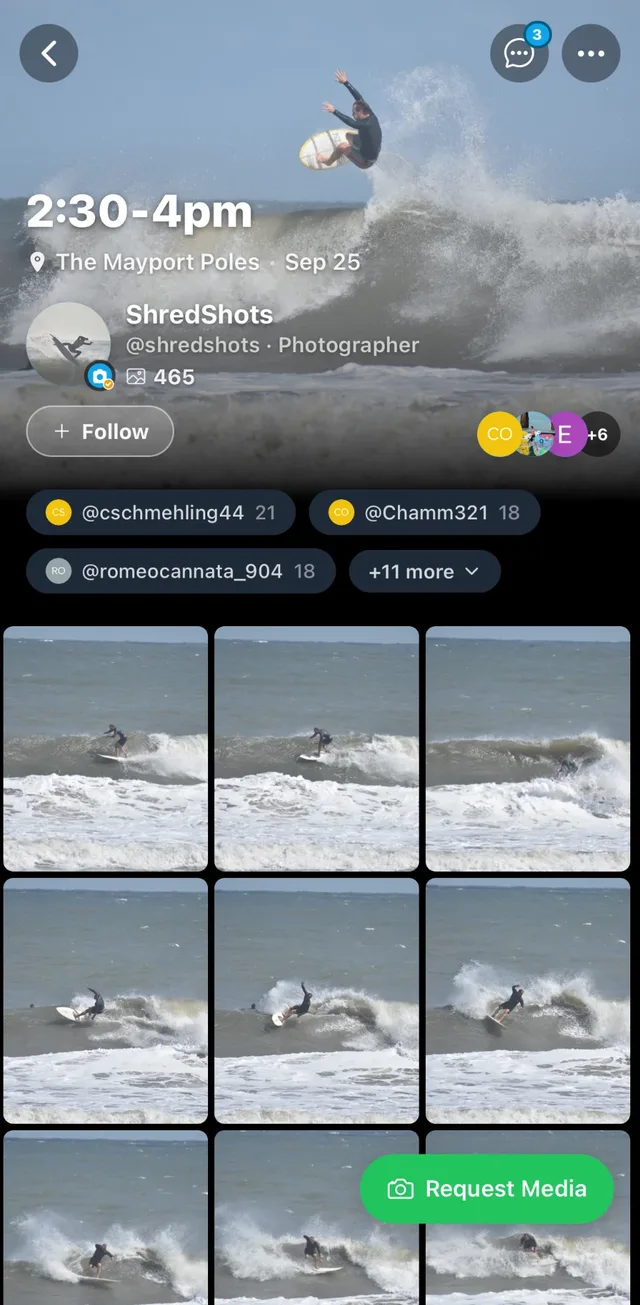
Select shots and add them to a person, which auto-tags and notifies them, or to a group like “Red rashguard.” A photo can belong to more than one group.
Filter the gallery
Groups show up as chips. Anyone viewing the session taps one and the gallery instantly shows only those shots.
They request, you approve
Surfers tap Request Media on the shots they want, and you approve with one tap. Not charging for shots? Turn on auto-grant and every request is approved instantly.
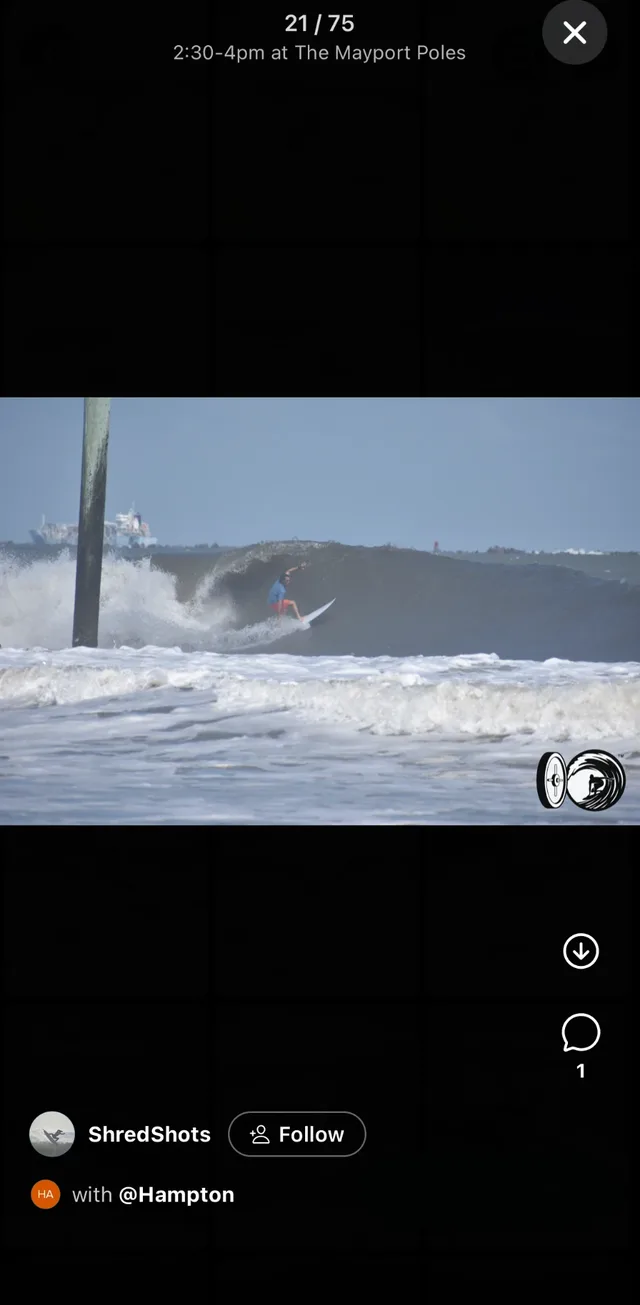
Full-size views are watermarked
Feed images stay smaller and clean so surfers can spot themselves. Open one full screen and it carries a watermark: the SurfVault mark, free and on by default, or your own logo on a paid plan. Originals stay private until you grant access. Try the watermark styles.
Group from your Library or the session page. People and groups work across every session you post.